SLF4J and LOGBack  Next Generation Logging! 31-08-2010
LOGBack : History It’s a successor of log4j LOGBack together with SLF4J designed to be the next generation logging framework There is no active developer community for log4j
What is SLF4J? Remember commons-logging? SLF4J is a façade for different logging tools Different logging tools can be plugged without any code change No classloader and memory leak issue Better support of MDC (Later!) No difference using with LOGBack but advantageous on the way!
Hello SLF4J import  org.slf4j.Logger ; import  org.slf4j.LoggerFactory ; public class HelloSLF4J { private static final Logger logger  = LoggerFactory.getLogger(HelloSLF4J.class); public static void main(String[] args) { logger.info("Hello World"); } }
SLF4J Enforcing Best Practices! if(logger.isDebugEnabled()) { logger.debug("Entry number: " + i + " is " + String.valueOf(entry[i])); }   logger.debug("The entry is {}.", entry); Parameterised Logging String manipulation after checking loglevel
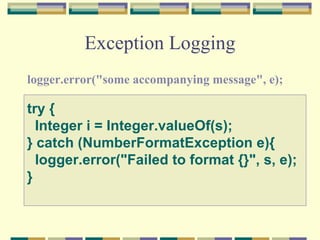
Exception Logging logger.error("some accompanying message", e);  try {    Integer i = Integer.valueOf(s); } catch (NumberFormatException e){    logger.error("Failed to format {}", s, e); }
What is LOGBack? “ LOGBack is faster, reliable and feature upgraded logging tool compared to its predecessors“
SLF4J and Logback : Dream Dates! Logback implements SLF4J natively No computational and memory overhead Fully compliant to SLF4J Faster they say! 10 times!! Smaller Blue Print Core, classic and access modules
Pre-Requirements logback.xml/logback.groovy slf4j-api.jar logback-classic.jar logback-core.jar
Why Logback Automatic Reloading LOGLEVELs can be changed on the fly.  <configuration scan=&quot;true&quot;  scanPeriod=&quot;30 seconds&quot;  >  Prudent Model Recovery (3 times slower) Multiple JVM can share same log file. Graceful recovery from IO failures(100% disk usage) without process restart. File Server recovery will let log files working automatically Filters And MDC Rolling Policies Compress and Roll Housekeeping with maxHistory  property
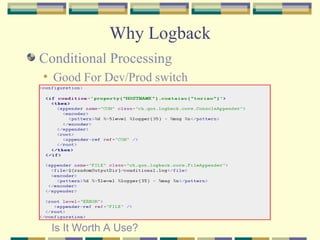
Why Logback Conditional Processing Good For Dev/Prod switch Is It Worth A Use?
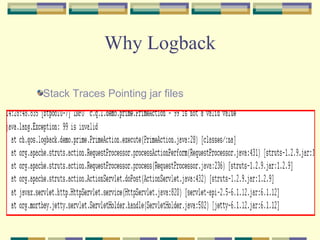
Why Logback Stack Traces Pointing jar files
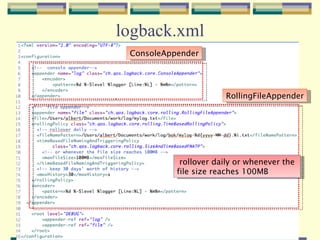
logback.xml ConsoleAppender RollingFileAppender rollover daily or whenever the  file size reaches 100MB
logback.groovy import ch.qos.logback.classic.encoder.PatternLayoutEncoder import ch.qos.logback.core.ConsoleAppender import static ch.qos.logback.classic.Level.DEBUG appender(&quot;STDOUT&quot;, ConsoleAppender) { encoder(PatternLayoutEncoder) { pattern = &quot;%d{HH:mm:ss.SSS} [%thread] %-5level %logger{36} - %msg%n&quot; } } root(DEBUG, [&quot;STDOUT&quot;])
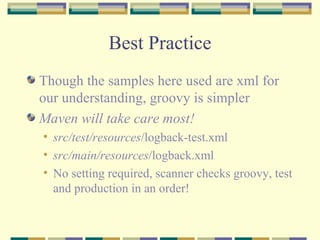
Best Practice Though the samples here used are xml for our understanding, groovy is simpler Maven will take care most! src/test/resources /logback-test.xml src/main/resources /logback.xml No setting required, scanner checks groovy, test and production in an order!
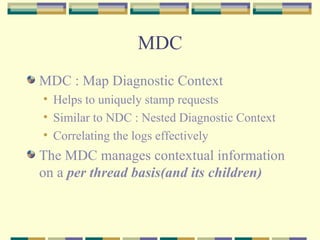
MDC MDC : Map Diagnostic Context Helps to uniquely stamp requests Similar to NDC : Nested Diagnostic Context Correlating the logs effectively The MDC manages contextual information on a  per thread basis(and its children)
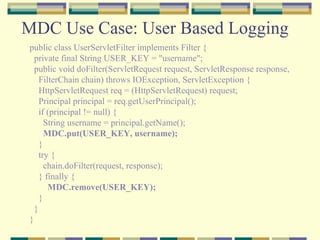
MDC Use Case: User Based Logging public class UserServletFilter implements Filter { private final String USER_KEY = &quot;username&quot;; public void doFilter(ServletRequest request, ServletResponse response, FilterChain chain) throws IOException, ServletException { HttpServletRequest req = (HttpServletRequest) request;  Principal principal = req.getUserPrincipal(); if (principal != null) { String username = principal.getName(); MDC.put(USER_KEY, username); }  try { chain.doFilter(request, response); } finally { MDC.remove(USER_KEY); } } }
MDC Use Case: User Based Logging    <appender name=&quot;CONSOLE“ class=&quot;ch.qos.logback.core.ConsoleAppender&quot;>      <layout class=&quot;ch.qos.logback.classic.PatternLayout&quot;>        <Pattern>%-4r [%thread] %-5level  C:%X{username}  - %msg%n</Pattern>      </layout>     </appender>   
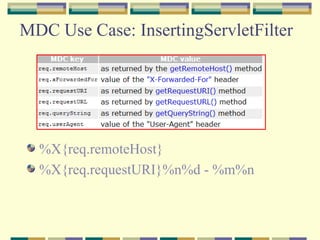
MDC Use Case: InsertingServletFilter  %X{req.remoteHost} %X{req.requestURI}%n%d - %m%n
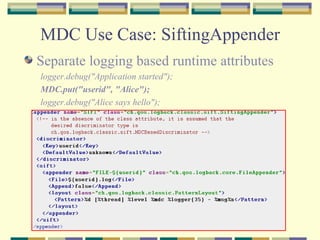
MDC Use Case: SiftingAppender Separate logging based runtime attributes logger.debug(&quot;Application started&quot;);  MDC.put(&quot;userid&quot;, &quot;Alice&quot;);  logger.debug(&quot;Alice says hello&quot;);
Filters: LevelFilter <appender name=&quot;CONSOLE&quot; class=&quot;ch.qos.logback.core.ConsoleAppender&quot;>      <filter class=&quot;ch.qos.logback.classic.filter.LevelFilter&quot;>       <level>INFO</level>       <onMatch>ACCEPT</onMatch>       <onMismatch>DENY</onMismatch>     </filter>     <encoder>       <pattern>         %-4relative [%thread] %-5level %logger{30} - %msg%n       </pattern>     </encoder>   </appender>
Filters: ThresholdFilter <configuration>   <appender name=&quot;CONSOLE&quot;     class=&quot;ch.qos.logback.core.ConsoleAppender&quot;>     <!-- deny all events with a level below INFO, that is TRACE and DEBUG -->      <filter class=&quot;ch.qos.logback.classic.filter.ThresholdFilter&quot;>       <level>INFO</level>     </filter>     <encoder>       <pattern>         %-4relative [%thread] %-5level %logger{30} - %msg%n       </pattern>     </encoder>   </appender>   <root level=&quot;DEBUG&quot;>     <appender-ref ref=&quot;CONSOLE&quot; />   </root> </configuration>
Filters:EvaluatorFilter  <configuration>   <appender name=&quot;STDOUT&quot; class=&quot;ch.qos.logback.core.ConsoleAppender&quot;>      <filter class=&quot;ch.qos.logback.core.filter.EvaluatorFilter&quot;>             <evaluator>           <expression>message.contains(&quot;billing&quot;)</expression>       </evaluator>       <OnMismatch>NEUTRAL</OnMismatch>       <OnMatch>DENY</OnMatch>     </filter>     <encoder>       <pattern>         %-4relative [%thread] %-5level %logger - %msg%n       </pattern>     </encoder>   </appender>   <root level=&quot;INFO&quot;>     <appender-ref ref=&quot;STDOUT&quot; />   </root> </configuration>
Good To Know! Logback-access powerful HTTP-access log with tomcat and jetty UI based  JMX support Statistical Data of UI accesses TeeFilter, CountingFilter, ViewStatusMessagesServlet  Tools : SLF4J Migrator tool
DANKE!!!

LOGBack and SLF4J

  • 1.
    SLF4J and LOGBack Next Generation Logging! 31-08-2010
  • 2.
    LOGBack : HistoryIt’s a successor of log4j LOGBack together with SLF4J designed to be the next generation logging framework There is no active developer community for log4j
  • 3.
    What is SLF4J?Remember commons-logging? SLF4J is a façade for different logging tools Different logging tools can be plugged without any code change No classloader and memory leak issue Better support of MDC (Later!) No difference using with LOGBack but advantageous on the way!
  • 4.
    Hello SLF4J import org.slf4j.Logger ; import org.slf4j.LoggerFactory ; public class HelloSLF4J { private static final Logger logger = LoggerFactory.getLogger(HelloSLF4J.class); public static void main(String[] args) { logger.info(&quot;Hello World&quot;); } }
  • 5.
    SLF4J Enforcing BestPractices! if(logger.isDebugEnabled()) { logger.debug(&quot;Entry number: &quot; + i + &quot; is &quot; + String.valueOf(entry[i])); } logger.debug(&quot;The entry is {}.&quot;, entry); Parameterised Logging String manipulation after checking loglevel
  • 6.
    Exception Logging logger.error(&quot;someaccompanying message&quot;, e); try {   Integer i = Integer.valueOf(s); } catch (NumberFormatException e){   logger.error(&quot;Failed to format {}&quot;, s, e); }
  • 7.
    What is LOGBack?“ LOGBack is faster, reliable and feature upgraded logging tool compared to its predecessors“
  • 8.
    SLF4J and Logback: Dream Dates! Logback implements SLF4J natively No computational and memory overhead Fully compliant to SLF4J Faster they say! 10 times!! Smaller Blue Print Core, classic and access modules
  • 9.
  • 10.
    Why Logback AutomaticReloading LOGLEVELs can be changed on the fly. <configuration scan=&quot;true&quot; scanPeriod=&quot;30 seconds&quot; > Prudent Model Recovery (3 times slower) Multiple JVM can share same log file. Graceful recovery from IO failures(100% disk usage) without process restart. File Server recovery will let log files working automatically Filters And MDC Rolling Policies Compress and Roll Housekeeping with maxHistory property
  • 11.
    Why Logback ConditionalProcessing Good For Dev/Prod switch Is It Worth A Use?
  • 12.
    Why Logback StackTraces Pointing jar files
  • 13.
    logback.xml ConsoleAppender RollingFileAppenderrollover daily or whenever the file size reaches 100MB
  • 14.
    logback.groovy import ch.qos.logback.classic.encoder.PatternLayoutEncoderimport ch.qos.logback.core.ConsoleAppender import static ch.qos.logback.classic.Level.DEBUG appender(&quot;STDOUT&quot;, ConsoleAppender) { encoder(PatternLayoutEncoder) { pattern = &quot;%d{HH:mm:ss.SSS} [%thread] %-5level %logger{36} - %msg%n&quot; } } root(DEBUG, [&quot;STDOUT&quot;])
  • 15.
    Best Practice Thoughthe samples here used are xml for our understanding, groovy is simpler Maven will take care most! src/test/resources /logback-test.xml src/main/resources /logback.xml No setting required, scanner checks groovy, test and production in an order!
  • 16.
    MDC MDC :Map Diagnostic Context Helps to uniquely stamp requests Similar to NDC : Nested Diagnostic Context Correlating the logs effectively The MDC manages contextual information on a per thread basis(and its children)
  • 17.
    MDC Use Case:User Based Logging public class UserServletFilter implements Filter { private final String USER_KEY = &quot;username&quot;; public void doFilter(ServletRequest request, ServletResponse response, FilterChain chain) throws IOException, ServletException { HttpServletRequest req = (HttpServletRequest) request; Principal principal = req.getUserPrincipal(); if (principal != null) { String username = principal.getName(); MDC.put(USER_KEY, username); } try { chain.doFilter(request, response); } finally { MDC.remove(USER_KEY); } } }
  • 18.
    MDC Use Case:User Based Logging    <appender name=&quot;CONSOLE“ class=&quot;ch.qos.logback.core.ConsoleAppender&quot;>      <layout class=&quot;ch.qos.logback.classic.PatternLayout&quot;>        <Pattern>%-4r [%thread] %-5level C:%X{username} - %msg%n</Pattern>      </layout>    </appender>   
  • 19.
    MDC Use Case:InsertingServletFilter %X{req.remoteHost} %X{req.requestURI}%n%d - %m%n
  • 20.
    MDC Use Case:SiftingAppender Separate logging based runtime attributes logger.debug(&quot;Application started&quot;); MDC.put(&quot;userid&quot;, &quot;Alice&quot;); logger.debug(&quot;Alice says hello&quot;);
  • 21.
    Filters: LevelFilter <appendername=&quot;CONSOLE&quot; class=&quot;ch.qos.logback.core.ConsoleAppender&quot;>     <filter class=&quot;ch.qos.logback.classic.filter.LevelFilter&quot;>       <level>INFO</level>       <onMatch>ACCEPT</onMatch>       <onMismatch>DENY</onMismatch>     </filter>     <encoder>       <pattern>         %-4relative [%thread] %-5level %logger{30} - %msg%n       </pattern>     </encoder>   </appender>
  • 22.
    Filters: ThresholdFilter <configuration>  <appender name=&quot;CONSOLE&quot;     class=&quot;ch.qos.logback.core.ConsoleAppender&quot;>     <!-- deny all events with a level below INFO, that is TRACE and DEBUG -->     <filter class=&quot;ch.qos.logback.classic.filter.ThresholdFilter&quot;>       <level>INFO</level>     </filter>     <encoder>       <pattern>         %-4relative [%thread] %-5level %logger{30} - %msg%n       </pattern>     </encoder>   </appender>   <root level=&quot;DEBUG&quot;>     <appender-ref ref=&quot;CONSOLE&quot; />   </root> </configuration>
  • 23.
    Filters:EvaluatorFilter <configuration>  <appender name=&quot;STDOUT&quot; class=&quot;ch.qos.logback.core.ConsoleAppender&quot;>     <filter class=&quot;ch.qos.logback.core.filter.EvaluatorFilter&quot;>             <evaluator>         <expression>message.contains(&quot;billing&quot;)</expression>       </evaluator>       <OnMismatch>NEUTRAL</OnMismatch>       <OnMatch>DENY</OnMatch>     </filter>     <encoder>       <pattern>         %-4relative [%thread] %-5level %logger - %msg%n       </pattern>     </encoder>   </appender>   <root level=&quot;INFO&quot;>     <appender-ref ref=&quot;STDOUT&quot; />   </root> </configuration>
  • 24.
    Good To Know!Logback-access powerful HTTP-access log with tomcat and jetty UI based JMX support Statistical Data of UI accesses TeeFilter, CountingFilter, ViewStatusMessagesServlet Tools : SLF4J Migrator tool
  • 25.